Amazon Alexa
- 4.1
- Rating
- 100.00M
- Installs
- Free
- Price

 Analysis by App-foxy
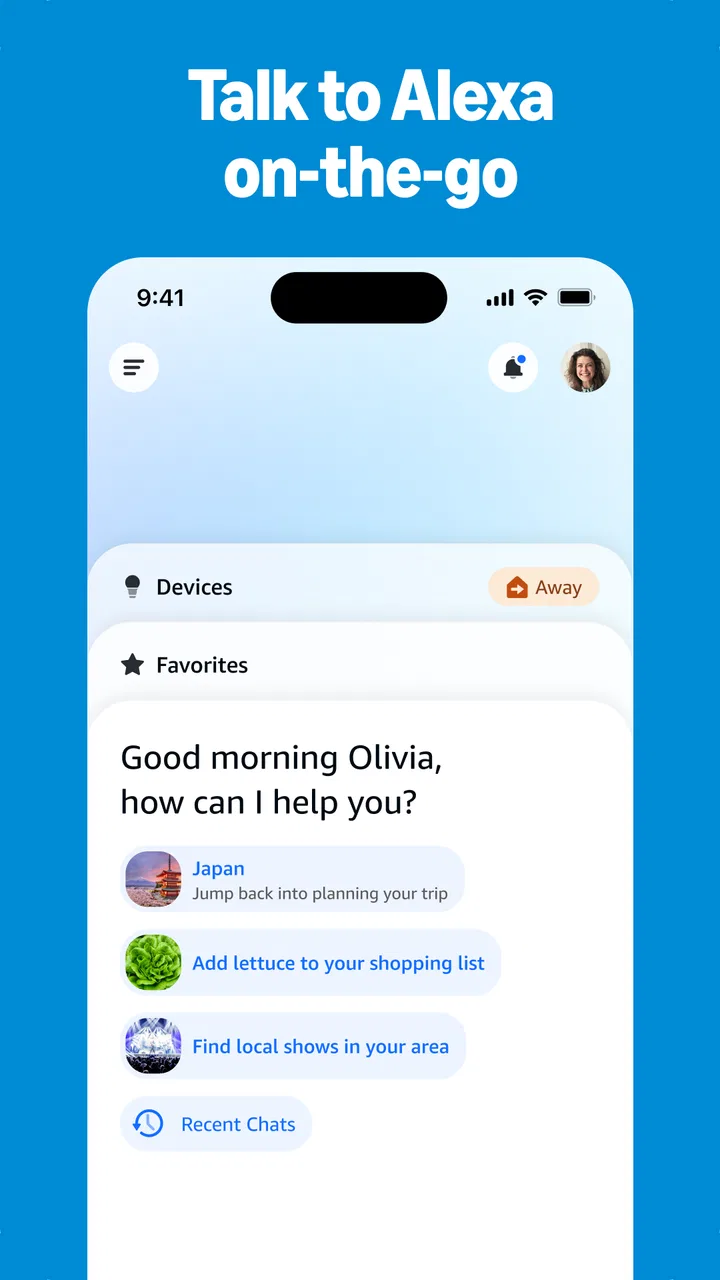
I started using Amazon Alexa as a practical way to make everyday voice control less fiddly, rather than as a replacement for every app on my phone. The Android and iOS app acts as the place where I set up Alexa, adjust its behavior, organize compatible devices, and review what is available in my account. Once the initial setup is done, the useful part is not staring at the app; it is building a few reliable habits so that asking for something feels quicker than reaching for a screen.
That distinction matters. Amazon Alexa is a free lifestyle app from Amazon Mobile LLC, and its central idea is simple: speak to the assistant instead of navigating menus. In my experience, it works best when I treat it as a control panel and a voice shortcut builder. It is less convincing when I expect it to understand every vague request, replace a dedicated music or shopping app, or solve a problem that requires careful visual input.
How I use Alexa from the first setup onward
The first useful workflow is to open the app and make the basic structure understandable. I would begin by signing in, checking the account and device area, and looking through the available settings before trying to automate everything. The app can feel busy because it brings together assistant controls, connected-device management, routines, communication options, and content-related features. Spending a few minutes learning where those controls live saves time later.
You May Also Like

 Blood Strike: 2.5 Anniversary
Blood Strike’s Loadouts Turn Every Drop Into a Tactical Gamble
A close look at Blood Strike’s custom loadouts: how fast access to signature weapons reshapes its battle royale rhythm, rewards preparation, and narrows the gap between fights.

 Pandora - Music & Podcasts
Pandora’s Music Is Easy to Start, but Harder to Recover
Pandora’s strength is its low-effort path from a seed to a station. Its weak spot is how much confidence it asks you to place in connection, setup, and quiet recovery.

 8 Ball Pool
8 Ball Pool Is Built on Rivalries, Rematches, and Routine
A close look at the rivalries, rematches, shared routines, and unanswered safety questions that turn a quick pool match into a persistent mobile community.

 Samsung Music
Samsung Music’s Quiet Strength Is Playing What You Already Own
Its reach comes less from spectacle than from dependable access to a personal library. That simplicity is both the app’s strongest retention engine and its ceiling.

 AccuWeather: Weather Radar
AccuWeather Review: A Quick, Clear Forecast for Everyday Decisions
For everyday plans, the best forecast is the one you can understand quickly. AccuWeather makes rain timing, radar, and local conditions easy to act on, with a few trade-offs.

 Hill Climb Racing
Why Hill Climb Racing Still Turns Crashes Into One More Run
A tiny car, a bumpy hill and one more upgrade: Hill Climb Racing keeps resurfacing because its simple chaos makes every near-miss feel personal.
More From Our News Desk



I found it more helpful to start with one repeatable situation instead of adding many commands at once. A morning routine is a good example: I might ask for information, hear a reminder, and then control a compatible device if my setup supports it. The point is not to create an impressive demonstration. The point is to make one part of the day predictable enough that I stop reaching for my phone.
Amazon Alexa becomes especially useful when the request has a clear verb and a clear object. “Set a timer,” “add milk to my shopping list,” or “turn off the lamp” is easier to remember and usually easier for the assistant to interpret than a long conversational explanation. I still speak naturally, but I have learned that a short request is often more dependable than trying to sound clever.
For a realistic evening example, imagine that I am cooking with wet hands. I can ask Alexa to set a timer, add an item to a list when I notice I am running low, and later ask it to turn off a compatible light. I do not need to unlock my phone or wipe food from the screen. That is where the app earns its place: small interruptions disappear from a routine that already exists.
The phone app is also important when voice alone is not enough. I use it to inspect a routine, correct a device name, or check whether an action was configured the way I intended. This makes the experience less magical but more manageable. Voice commands are fast; the app is where I can slow down and organize the system.
One habit I recommend is naming devices in ordinary language and keeping names distinct. If two lights have nearly identical names, a spoken command becomes a guessing game. I prefer labels based on location or purpose, then group related devices where that makes sense. This is a small setup decision, but it has a bigger effect on reliability than endlessly repeating the same command louder.
Settings I would check before building routines
The settings deserve more attention than they usually get. I would review language, notification behavior, communication preferences, and the way Alexa handles voice interaction. The best configuration depends on how you use the assistant: a household that shares devices needs clarity, while a single user may prefer a simpler arrangement with fewer alerts.
Privacy controls are worth examining carefully. Voice assistants are convenient because they respond to spoken requests, but convenience should not mean accepting every default without thought. I would look through the app’s privacy and history areas, understand what can be reviewed or managed, and decide what level of voice interaction feels comfortable. This is not a reason to avoid Alexa; it is a reason to use its controls deliberately.
Notifications are another source of friction. If the app sends too many updates, useful reminders can disappear among less important messages. I prefer to keep alerts that support an actual habit and reduce the rest. This makes the phone component quieter and prevents Alexa from feeling like another stream of interruptions.
Families should also think about who is allowed to use which features. A shared household can benefit from common lists and routines, but it can also create confusion if everyone uses different wording or changes the same setup. I would agree on simple names for shared devices and keep important routines easy to identify. That is more practical than expecting every person to remember a complicated command.
Another useful check is the device list. Remove or rename items that are no longer part of your home, and avoid allowing old labels to remain alongside new ones. A stale device name can make a voice request ambiguous. Keeping this list tidy is one of the least exciting tasks in Alexa, yet it directly improves day-to-day use.
Compatibility is the question many people should answer before committing to the app. Alexa is strongest when the devices and services you already use work with it in a way that matches your needs. If your home contains products designed around another assistant, adding Alexa may create more setup work than convenience. I would check the specific devices I care about first rather than assuming that every smart product will behave identically.
Shortcuts and routines that actually save time
Routines are where I see the biggest difference between casual use and experienced use. Instead of issuing several separate commands, I can create a named sequence for a repeated moment. The value comes from consistency: the phrase should be easy to remember, the actions should be useful together, and the result should not require extra correction.
I would begin with a routine that combines actions I already perform in sequence. For example, a leaving-home routine might handle several compatible tasks that I normally check one by one. A bedtime routine can be similarly practical. I would avoid filling it with novelty actions simply because they are available; every extra step is another possible source of confusion.
A non-obvious advantage is that routines can reduce the need to remember exact device names. I can use one phrase for a situation rather than recalling each individual command. That makes Alexa more approachable for other people in the home as well. The trade-off is that a routine hides several actions behind one trigger, so I need to review it whenever the household changes.
Lists are another feature I find more useful than expected. I treat a shopping list as a capture tool, not as a complete grocery-management system. When I notice something is missing, saying it immediately is faster than opening an app and finding the correct list. Later, I can review and organize the entries properly. This two-step workflow works well because it separates quick capture from careful planning.
Timers and reminders have different roles, and I try not to mix them up. A timer is suited to something that ends after a short period, such as cooking. A reminder is better for an action I need to remember at a particular time or in a particular context. Using the right type prevents the common mistake of setting a timer for something that really belongs on a schedule.
For faster results, I use a consistent command pattern: action first, target second, and details last. That structure is not mandatory, but it helps me notice when a request is too vague. If Alexa misunderstands, I shorten the request instead of repeating the entire sentence. I also avoid creating several routines with nearly identical names, because the quickest shortcut is not useful if I cannot remember which phrase activates it.
The app can also be used as a visual fallback. When a spoken response is not enough, I open the relevant screen and make the adjustment manually. This is particularly sensible for setup tasks, device organization, and reviewing a routine. Voice is excellent for execution; touch is often better for inspection and correction.
Where the assistant still has limits
Alexa is not equally strong at every kind of request. It is comfortable with short commands, simple information requests, timers, lists, and compatible home controls. It is less suitable when I need to compare several options visually, edit detailed text, manage a complex calendar, or work through a long sequence of conditions. In those cases, a conventional app usually gives me more control.
Voice recognition can also be affected by background noise, unusual names, accents, and multiple people speaking at once. I have found that clear device names and concise wording help, but they do not remove every mistake. A routine that controls several things should therefore be tested in ordinary conditions, not only in a quiet room during setup.
There is a practical dependency on a compatible setup. Without devices or services that make sense for your routine, Alexa may become mainly a voice interface for basic assistant tasks. That can still be worthwhile, but the value is different. I would not buy into a larger ecosystem solely because the app looks capable; I would first identify the repeated actions I want to simplify.
People who prefer complete control from one screen may find the voice-first approach slower. A dedicated music app is usually better for browsing albums, comparing playlists, or choosing a precise track. A shopping app may offer stronger product discovery and organization. A calendar app is generally clearer for viewing a week. Alexa complements these tools, but it does not make them unnecessary.
There is also a learning curve around routines. The first few are satisfying, but poorly planned routines can become confusing. If a routine changes several things and one action fails, I may need to inspect the setup to understand what happened. My solution is to keep routines focused, give them memorable names, and avoid combining unrelated tasks simply to reduce the number of voice commands.
The age rating is Teen, which is a useful reminder that this is not just a toy for children. Shared household use should be guided by sensible account and privacy choices. I would also make sure younger users understand that a voice assistant is not the same as a private conversation with a person, especially when they are asking for information or using shared lists.
How it compares with familiar alternatives
Compared with using a phone manually, Alexa wins when my hands are occupied or the action is repetitive. Asking for a timer while cooking is more convenient than unlocking a device, finding the clock, and entering a duration. Adding an item to a list immediately is another strong example. The advantage is speed and reduced friction, not a richer visual experience.
Compared with another voice assistant, the better choice depends largely on the devices and services already in a person’s life. I would choose Alexa when its ecosystem fits my home and when I want routines and voice-triggered actions to be part of daily habits. I would lean toward a competing assistant if my phone, smart devices, and preferred services already work more naturally there. Switching assistants is not automatically an upgrade; it can simply move the setup work to another place.
Compared with dedicated smart-home apps, Alexa can provide a more unified spoken command, but a manufacturer’s app may expose more detailed controls. I use the dedicated app when I need advanced device configuration and Alexa for the quick action afterward. This division is more realistic than expecting one interface to handle every technical setting equally well.
Compared with typing into a search or productivity app, Alexa is better for immediate capture and simple answers. It is not my first choice for research that requires reading several sources, checking exact wording, or keeping a detailed record. Knowing that boundary makes the assistant feel dependable instead of disappointing.
Who should use it and who should skip it
I think Amazon Alexa is a good fit for someone who repeats the same small tasks every day and wants to perform them without touching a screen. It is especially appealing to households with compatible devices, people who cook frequently, users who rely on reminders and lists, and anyone who benefits from hands-free control. The free price makes it easy to test without treating the first setup as a major commitment.
I would be more cautious if you dislike voice interaction, need highly visual organization, or expect flawless interpretation of complicated instructions. It may also be the wrong choice if your existing smart-home platform already handles everything smoothly and adding another assistant would only duplicate controls. In that situation, a dedicated app or the assistant already integrated into your phone may be simpler.
The app has been available since November 17, 2014, and its scale is clear: it has passed one hundred million installs, with an average rating of 4.1 from around 5.3 million ratings and roughly 145 thousand written reviews. Those figures suggest broad adoption, but they do not guarantee that every household will find the same value. My own recommendation is based more on whether you can name three repeated tasks Alexa would genuinely make easier.
My verdict after building repeatable habits
Amazon Alexa is most convincing when I stop treating it as a novelty and use it as a small layer between intention and action. The app helps me configure that layer, organize devices, create routines, and adjust the experience when a shortcut stops fitting my day. Its strongest moments are ordinary: a timer started without touching a screen, a shopping item captured before I forget it, or several compatible actions handled through one phrase.
My advice is to begin with one routine, tidy the device names, review privacy and notification settings, and keep a visual app available for detailed work. Those steps make the experience faster without pretending that voice control is perfect. I would also revisit routines whenever the household changes, because a shortcut is only useful while its actions still match real life.
The current version is 2.2.656185.0 and it requires at least OS 10, so I would check that the phone meets that requirement before planning a setup around it. For the right user, the app is a practical free assistant with enough flexibility to support genuine habits. For someone who wants a complete replacement for every specialized app, it will feel limited. My bottom line is simple: use Alexa for repeated hands-free actions, and keep dedicated apps for tasks where precision, browsing, or detailed control matters more.
FAQs for Amazon Alexa
01What devices are compatible with the Amazon Alexa app?
The Amazon Alexa app is compatible with a wide range of devices, including iOS and Android smartphones and tablets. It also works with Amazon Echo devices, Fire tablets, and certain smart TVs. Before downloading, ensure your device meets the app's system requirements to avoid compatibility issues.
02Can I use the Amazon Alexa app without an Echo device?
Yes, you can use the Amazon Alexa app without an Echo device. The app allows you to manage smart home devices, set alarms, and access Alexa's skills and features directly from your smartphone. However, for full functionality, pairing with an Echo device enhances the experience.
03What are the main features of the Amazon Alexa app?
The Amazon Alexa app offers a variety of features, including voice interaction, music playback, smart home control, and access to a wide range of Alexa skills. It also provides weather updates, news briefings, and the ability to create shopping lists and reminders, making it a versatile tool for everyday use.
04Is the Amazon Alexa app free to use?
Yes, the Amazon Alexa app is free to download and use. However, certain features may require an Amazon Prime membership or subscriptions to third-party services. It's important to review any additional costs associated with the app's features before fully integrating it into your daily routine.
05How secure is the Amazon Alexa app with personal data?
Amazon takes security seriously and implements measures to protect your data on the Alexa app. Users have control over their privacy settings, including voice recordings and location services. Regular updates and reviews of privacy policies help maintain a secure experience, but always review settings to ensure they meet your privacy preferences.
Pros
- Integrates with smart home devices seamlessly.
- Wide range of voice commands available.
- Regular updates with new features.
- Multi-user support for personalized experiences.
- Compatible with various third-party apps.
Cons
- Requires stable internet connection to function.
- Privacy concerns with always-on microphone.
- Limited offline functionality.
- Voice recognition can be inconsistent.
- Some features restricted by region.

Amazon Alexa
Gallery